Open the downloaded APK on your phone. Allow installation from your browser or file manager when Android asks.
Open NOVA and activate your Android Studio access key.
Import a video, generate captions and make your first edit.
Android 10+ · 64-bit · 6 GB RAM recommended. Preview release; features differ from desktop. Behind-person captions are not available on Android.
Downloading the installer does not include a paid access key. Windows and Android Studio use separate plans. Already installed? Update over the existing app to keep your projects.
AI CLIPPING✦AUTO CAPTIONS✦SMART REFRAMING✦LOCAL EDITING✦YOUR OWN STYLE✦AI CLIPPING✦AUTO CAPTIONS✦SMART REFRAMING
THE SHORT VERSION
A serious toolkit. A simpler workflow.
30Caption styles in the desktop collection
3Core formats: vertical, landscape, square
1Workspace from first cut to final export
LocalPC transcription and video rendering
BUILT FOR YOUR CREATIVE PROCESS
Find the moment. Make it unmistakably yours.
Start with suggestions. Finish with your judgment. NOVA brings your clipping and editing tools into your local workspace.
✦01
Find the good part.
Discover candidate clips from the transcript. Review the hook, score and context before choosing what makes the cut.
You choose the final story.
CC02
Every word has a place.
Edit caption words and timing, highlight the spoken phrase, and build a recognizable style with colours and typography.
Switch captions on or off.
⌗03
Frame for the feed.
Work in vertical, landscape or square. Use face-aware framing where it fits, then refine the result yourself.
Keep creative control of the crop.
↔04
Make precise cuts.
Trim, split and arrange your clips in the timeline. Give hook text, overlays, branding and audio their own space.
One edit, many finishing touches.
▣05
Your PC does the work.
Transcribe and render locally. Choose CPU or supported GPU acceleration, with visible job and worker status.
Performance depends on your hardware.
⌁06
Your studio. On your phone.
Import footage, generate captions locally, make touch edits and export directly on Android.
Standalone Android Studio · no PC pairing.
HOW IT WORKS
From a long recording to a clip worth sharing.
01
↑
Bring your video
Import your recording or a supported video link.
02
✦
Discover the moments
Review AI-assisted picks and choose the clips to develop.
03
Aa
Make the edit
Refine the words, framing, rhythm and visual style.
04
↗
Preview & export
Render the finished look, review it, then save your clip.
YOUR WORDS, YOUR SIGNATURE
Try a look. Watch it come to life.
Switch styles, adjust the colour, and find a direction for your next clip.
0:00
Caption style demo with illustrative text, not a transcript. The supplied video has no audio.
PICK YOUR STYLE
Interactive website previews demonstrate the style direction. Use NOVA Studio to edit your own transcript and render the final video.
THE WHOLE PICTURE
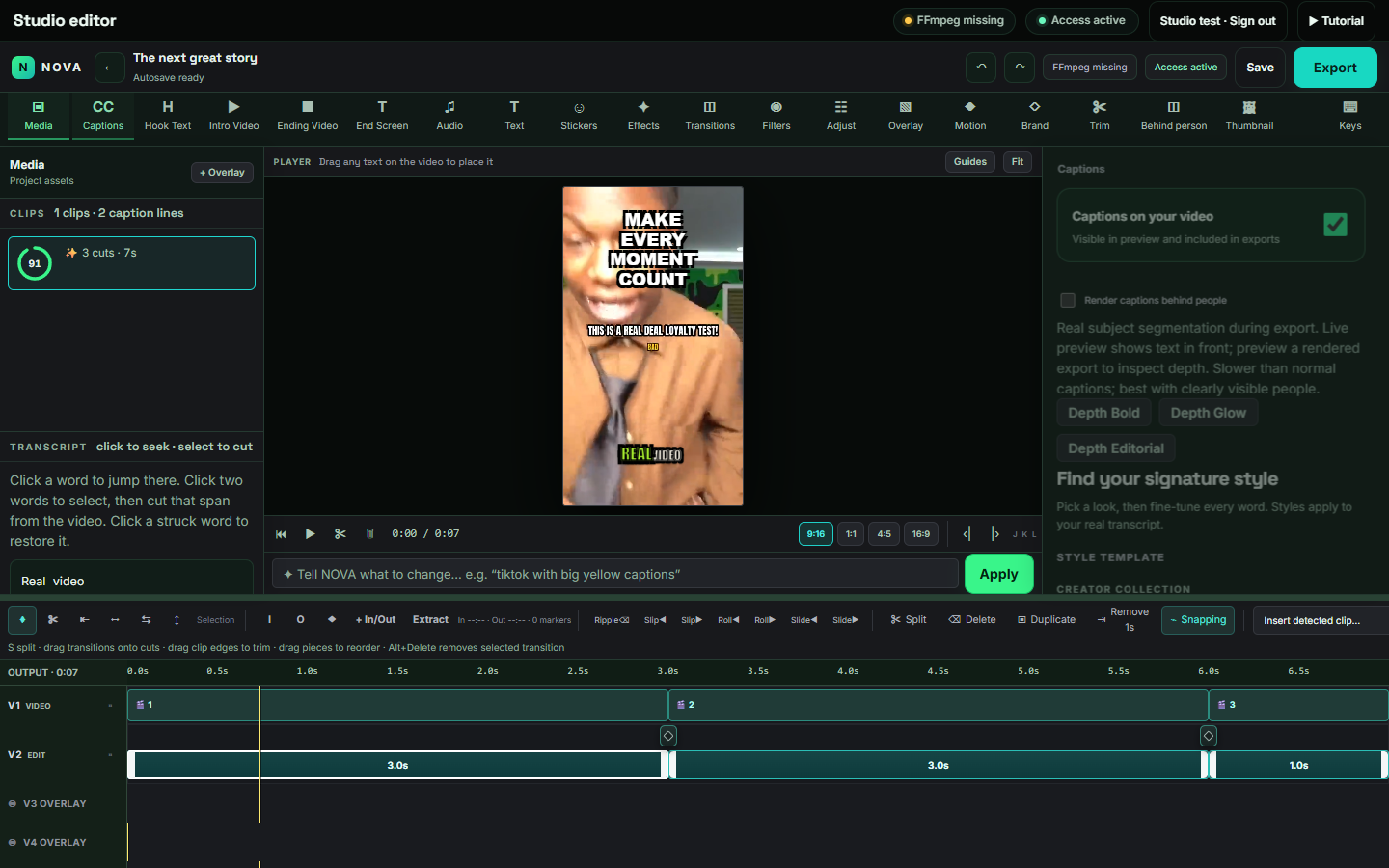
Your complete creative workspace.
Hooks, captions, media and the timeline. Everything close to the preview, so you can focus on the edit.
● ● ●NOVA AI / STUDIO EDITORActual interface · sample project
Separate Windows and Android Studio access keys. Choose the matching duration on PrimeUnlock; the checkout confirms your final price and purchase currency.
LOCAL BY DESIGN
Your footage stays in your creative workspace.
Core desktop transcription and rendering happen on your PC. Activation, model downloads and online imports use the internet. Optional remote AI services may receive prompts and transcript text; leave them unconfigured for a local text-AI workflow.
Your recording→NOVA · YOUR PC→Your finished clips
BEFORE YOUR FIRST CLIP
Good questions. Clear answers.
Is NOVA a browser editor or a desktop app?
NOVA runs locally as a Windows application or the standalone Android Studio app. This website lets you explore styles, get access and download releases; it does not pretend to process your videos in the cloud.
Can I customize captions?
Yes. Choose a preset, change the words, timing, colour, size and position, or turn captions off. The desktop editor has a rendered-preview option for checking the finished look.
How do behind-person captions work?
The desktop renderer creates a subject mask locally. Use Render & preview to inspect the actual effect. The normal editing overlay does not show real-time segmentation.
Do I need an NVIDIA GPU?
No. CPU processing is available. Compatible NVIDIA hardware and runtime libraries can accelerate transcription; available GPU encoders depend on your hardware and drivers.
Does Android Studio need a PC?
No. Android Studio processes videos and speech on the phone. Install the APK, activate an Android Studio key, and import a video. Use Android 10 or newer on a 64-bit device; 6 GB RAM or more is recommended.
Is the Windows download free to activate?
Downloading and activation are separate. Choose a plan and use the access key provided through the linked purchase or support channel.
Where can I get help?
Use the Discord support link below to contact NOVA. Include the version, the step that failed and the relevant error message.